

Running a church worship band: keeping a rotating team in sync
How to organise a worship team - shared setlists per service, keys and BPM on screen, arrangement recordings for rotating volunteers, and a service calendar.
By @KHeavy · Updated 26 October 2026
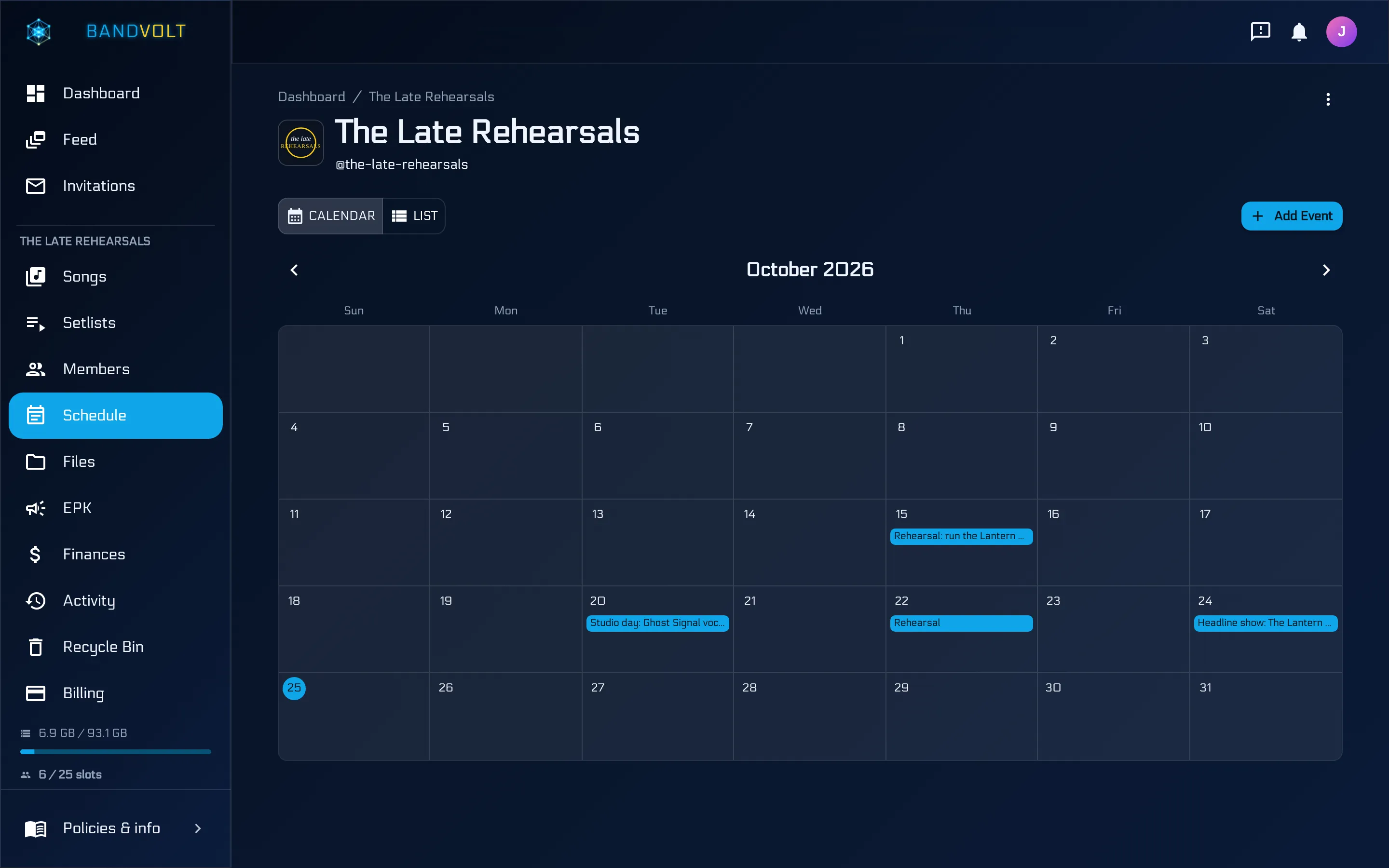
The short answer: a worship band runs on a shared song library, a setlist for each service, keys and tempos everyone can see, and a calendar the whole team can open. The extra difficulty is that the lineup changes. This Sunday’s drummer was not at last Sunday’s rehearsal, and they still have to play your arrangement rather than the one on the record. BandVolt gives the team one workspace for that, and the setlists, the calendar, the versions, and the comments are on the free Basic tier.
Most teams hold it together with a group chat, a folder of chord charts, and a worship leader who answers the same three questions every Thursday. Which songs? Which key? Which recording? Here is a system that answers those before anyone has to ask.
One library, and the arrangement you actually play
Put every song the team uses into one library. The recording, the lyrics, the key, the BPM, and the time signature belong on the song. When a volunteer is playing something for the first time on Thursday, they open it and hear the arrangement, instead of being sent a YouTube link that is in a different key from the one you are using on Sunday.
Keep more than one version when you need to. The original recording and your team’s arrangement can sit side by side, labelled and dated. Pin your arrangement on the service setlist. Leave the original in the history for anyone who wants to hear where the song came from. Do not make the team guess which of three videos in a chat is “the one we do”.
If the evening service is stripped back and the morning is full band, those are two setlists pointing at two versions of the same songs. You do not need two copies of the song. The mechanism is the same one a gigging band uses to rehearse a live edit instead of the album, written up in rehearse the live version, not the album cut.
Chord charts and lyric sheets go on the song as files, next to the audio. A chart in a separate folder drifts out of date the moment someone changes key and updates the song but not the PDF. Song files and the general band file folders are different piles. Use the song for the chart. Use the folders for anything that is not a song.
A setlist for every service
Sunday morning, Sunday evening, midweek, the carol service. Each one gets its own setlist, linked to that service on the shared calendar. The people on that week see the songs, the order, the keys, and the tempos before they arrive.
Build the list from the library so you are not retyping titles into a document. Drag the order. Pin the version for that service. Check the length if the service has a fixed slot for music, the same way a support band checks a set against a stage time. The build itself is short. The five-minute setlist is the sequencing and the mechanics, including a printed sheet if someone on the team still wants paper on a stand. The same idea, for a pipe band, a brass band, or an orchestra, is on BandVolt for ensembles.
In rehearsal, playback mode shows the key, the BPM, the lyrics, and the time signature for the current song. For a team that runs a click, the tempo is on the screen. For a singer who needs the capo, the key is on the screen. You are not holding both in one person’s memory and hoping the new guitarist was told.
The walkthrough video on this page is that setlist: songs in order, the version you mean, and the service it belongs to.
A calendar the rota can see
Services, rehearsals, and the extra dates - a wedding, a baptism, a rehearsal that is not the usual Thursday - go on one calendar. Date, time, place, description. Link the setlist. Attach anything that is specific to that day, the way a gig carries its rider. The team opens the event and the plan is there. The gig nobody put in the calendar is what happens when that date lives in a chat instead.
Flag the services you want published and they can appear as upcoming shows on a free Electronic Press Kit, if you use one for the church’s public music page. Leave rehearsals unflagged. The team sees the whole diary. The public page sees what you flagged.
When the date or the set changes, edit the event once. The people who were going to turn up for the old plan get an event notification, instead of a message they may not scroll back to.
People who come and go
The lineup is a rota, not a fixed five-piece. Treat access the same way.
Invite each volunteer to their own account, by email or username. Do not share one login and a password in the chat. When someone steps down, revoke their access. The songs, the setlists, and the calendar stay with the team. A shared password cannot be revoked from one person without locking out the rest, which is how old logins linger.
Basic includes 10 workspace slots. That is 10 people with access, which covers a small team and runs out the moment you have a pool of drummers, several vocalists, and a couple of deps. Premium is £9.99 a month for the whole team, not per person, with 25 slots. Packs of 10 more slots are £2.49 a month on Premium if the pool is larger still. One person uses one slot no matter how many services they play. The numbers are on the pricing page.
Setlists, the calendar, versions, and comments are on Basic. Premium is the point at which you need the larger roster, or a guest who should work on one song without joining the team. That guest invite - a Contributor who can upload, or a Reviewer who can comment - is the same tool a band uses for a session player, and it is Premium.
A volunteer who only needs to hear one song before Sunday does not need a slot at all. Send a public share link. They press play. No account.
Songs you have written
If the team writes its own music, the demos live in the same library, private unless you share them. Another congregation’s musicians, or another site in the same church, can have a public link when you want them to learn a song. Revoke it if the arrangement is not ready to travel. You are not uploading the demo to a public streaming page just so one guitarist across town can hear the key.
Key, BPM, and the version you want them to learn should be on that song before you send the link. Otherwise you have moved the Thursday questions into someone else’s inbox.
The Thursday test
Before you publish the Sunday set, open it the way a volunteer will, on a phone, as if you were not at the last rehearsal.
- The setlist is linked to Sunday’s event, not floating as a message.
- Each song is pinned to the arrangement you will play.
- Key and BPM are filled in.
- The chart on the song matches that key.
- The recording plays without asking for a password.
If those are true, the new drummer can prepare. If they are not, the worship leader will spend Thursday answering them again. The point of the workspace is that the answers are on the song and on the service, and they stay there when the lineup changes.
Frequently asked questions
How do you keep a worship team on the same arrangement when the players change each week?
Put the arrangement you actually play on the song as its own version, and pin that version on the service setlist. A volunteer who was not at last Sunday opens the set and hears the recording, the key, and the tempo, instead of asking in a group chat which version you mean.
Where should chord charts and lyric sheets live?
On the song, with the audio. Charts and sheets are supporting files on that song. The band's general file folders are for things that are not a song, such as a service rota exported from somewhere else or a building plan.
Can volunteers join without paying, and without seeing everything?
Each person has their own free login and is invited into the team workspace. They do not buy a seat. If someone only needs one song, a public share link lets them stream it with no account. A scoped invite, on Premium, is for a guest who must comment or upload without seeing the rest of the team.
What happens when the team is bigger than 10 people?
Basic includes 10 workspace slots, which is 10 people with access. Premium includes 25 slots for the whole team at £9.99 a month, and you can add packs of 10 slots for £2.49 a month. One person is one slot, however many services they play.
Will the congregation need an account to hear an original song?
No. A public share link plays the song in the browser. You can revoke it. Originals stay private to the team until you choose to send that link, including to musicians at another site who need to learn it.
Topics: worship band · church music team · rotas and setlists