

Send your music to anyone - no account needed
A label, a promoter, your mum. Public share links give anyone a clean page to stream your songs from, without making them sign up for anything.
By @KHeavy · Updated 26 October 2026
You finally have a mix you are proud of. Now you need to get it to a promoter, a label contact, and your bassist’s friend who “knows someone”.
The usual options are all bad. A WeTransfer link that expires before they open it. A private SoundCloud link that ends up forwarded further than you meant. An email attachment that bounces because the WAV is too big, or arrives as a compressed chat file that is not the mix you bounced.
The short answer: send a public share link. The listener gets a clean page and presses play. No account, no app, no download required on their side. You choose whether the link follows the active mix or stays on one version, and you can revoke it when the conversation is over. Song links are on every tier. A link for the whole album or EP needs Premium.
A page, not a file
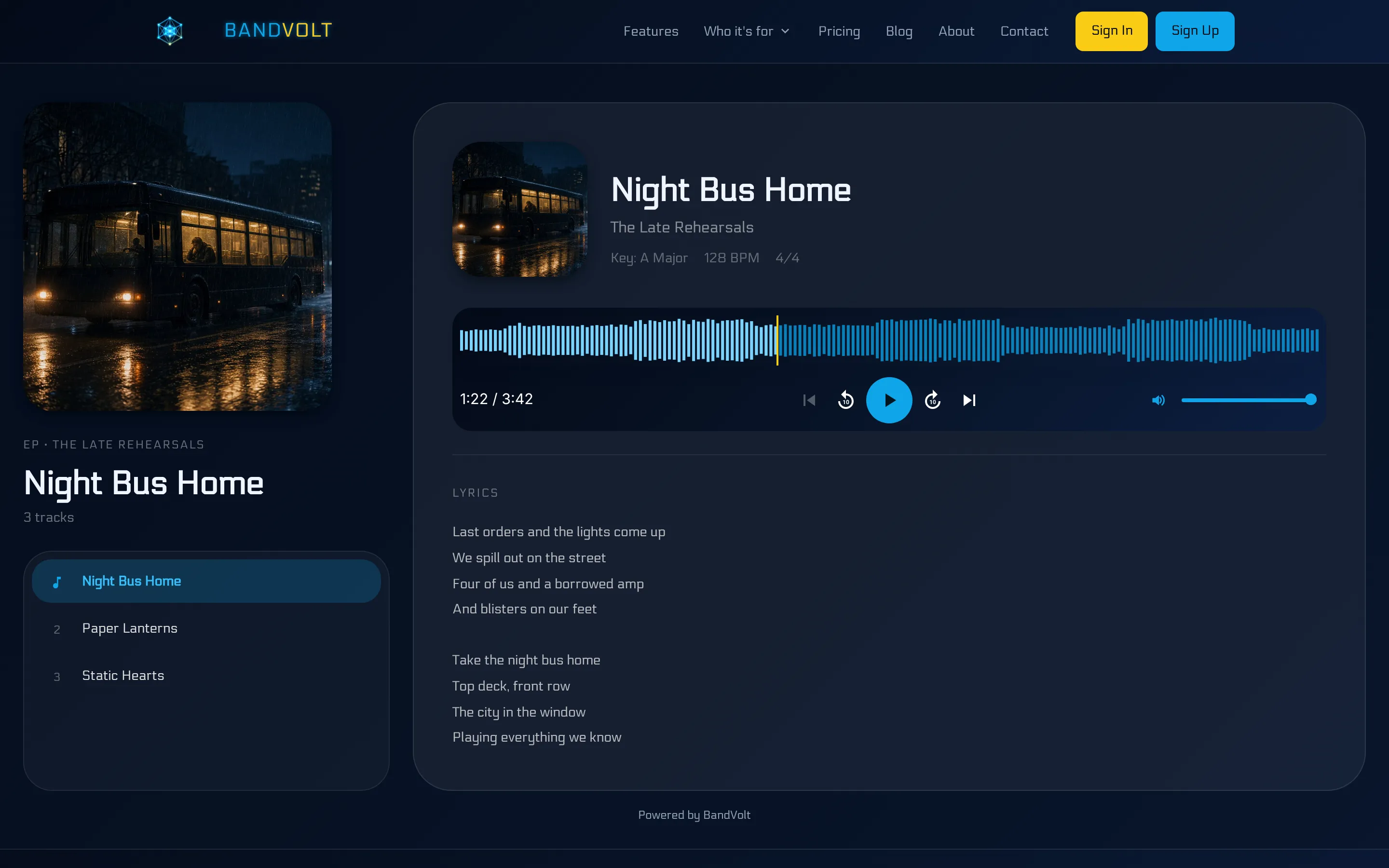
A public share in BandVolt is a page with the artwork, a waveform, the song’s metadata, and the lyrics if you have added them. Key, BPM, and time signature show when they are on the song, which is why a session player can learn the tune from the link instead of a second email that says “it’s in A”.
They click. The music plays. Every extra step you put between a busy promoter and the chorus is a step where they give up, and “create an account to listen” is the step most of them will not take.
The page is listen-only. They do not see your other songs, your calendar, your files, or the comment thread. The band’s workspace stays the band’s.
Song link or the whole record
You can generate a public link for one song on every tier. Basic bands can keep up to three of those active at once. Premium bands get unlimited song links, and they can also share an album or EP as one collection link, so the release goes out as a record instead of five separate URLs.
A collection page adds track order, navigation, and continuous playback. That is the right send when the pitch is the EP itself. The full walkthrough of that - when to send a collection, and when an EPK is the better first link - is in how to send your EP to a label.
For one song, the song link is enough. A lead single, a rough for a friend, a track a dep needs to learn. Do not build a press page for a single listen.
Follow the active mix, or pin the version
This is the control that stops the stale-bounce problem.
A link can follow the song’s active mix. Upload a new master, set it active, and the same URL plays the new file. You are not sending a fresh link every time the vocal comes up a decibel.
Or the link can stay locked to a specific version. Use that when you have sent a label a mix and you are already working on the next one. They keep hearing the bounce you meant them to hear. You keep working. The two do not collide.
Either way the audio is the file you uploaded. BandVolt does not compress it into a preview. If you later need the WAV itself on your own disk, Select all and Download on the song’s mixes. The share page is for listening. The download is for the band.
Revoke the link and it dies. There is no leftover upload on a transfer service, and no private SoundCloud still circulating from eight months ago. The habit of “which version did we send them?” goes away, because the link was either following the active mix or pinned, and you chose which. That is the quiet win next to stopping the final_FINAL_v3 filenames.
Which link for which person
Four things get called “sending the music”. They are different jobs.
| Who needs it | What you send |
|---|---|
| “Have a listen to this song” | A public song link |
| “Here is the EP, in order” | A public collection link, on Premium |
| “Who are you, and how do I book you?” | The Electronic Press Kit |
| “Please leave notes on the mix” | An invite, not a share link |
The EPK also plays featured tracks, so a booker can hear you without a second URL. It is still a press page: bio, photos, videos, booking contact, upcoming shows. A share link is the listen. Use both when the email needs both, and do not make one of them do the other’s work.
If the person needs to comment, compare versions, or upload a take, a public link is the wrong tool. They can hear the song. They cannot write on it. On Premium, invite them as a collaborator on that song or on the whole album. A Contributor can upload and download. A Reviewer can stream, run Quick Compare, and comment, without taking the files away. Either way they only see what you shared.
And if you are a studio handing finished masters to a band that should own them, that is not a share link either. A share is a listen. Content transfer moves the song or the album into their workspace, with the mixes and the history. Premium to send. Basic can receive if they have the storage.
Before you send it
Open the link yourself, logged out, on a phone. The things that go wrong are boring and visible in thirty seconds:
- The title is the song, not
final_v7_louder. - The version you hear is the one you meant, whether you pinned it or followed the active mix.
- The first chorus arrives without a login wall.
- Lyrics and key are there if the listener will need them. A dep will. A playlist curator might not.
- You still have a spare song-link slot on Basic, or you have revoked an old one you no longer need.
Three active song links on Basic is a real limit. It is also enough for a single, a second track, and one private listen, if you revoke the links when the conversation is finished. Hoarding dead links is how you hit the cap in the middle of a pitch. Premium removes that cap and adds the collection link for the full release.
The walkthrough video on this page is the share itself: a song link, a link that follows the active mix, and revoking one you are done with.
Built for the people outside the band
Your band works inside the workspace. Versions, comments, the calendar, the files. Share links are for everyone else: labels, promoters, venues, session players, family, the friend of the bassist. They hear the music. They never see the mess behind it.
Frequently asked questions
Does the person I send a share link to need a BandVolt account?
No. They open the link and stream in the browser. No signup, no app install, and they do not see the rest of your band's workspace.
How many public song links can I have?
Basic bands can keep up to three active song links. Premium bands get unlimited song links, plus public links for a whole album or EP. You can revoke any link at any time.
Does the link keep playing the latest mix?
You choose. A link can follow the song's active mix, so the listener hears the current version, or stay locked to a specific version so a label does not hear a newer bounce you were not ready to send.
Should I send a share link or an EPK?
Send a share link when you want someone to hear a song or, on Premium, a whole release. Send the Electronic Press Kit when you want bio, photos, videos, booking contact, and upcoming shows as well as music. Many pitches use both.
Can a listener download the file from a public share?
A public share is a listen page: artwork, waveform, metadata, and lyrics. It is not a handoff of the masters. If a studio needs to give the band the finished files for good, that is a content transfer, which is a different step.
Topics: private music sharing · send music to a label · share link