

Mix Health - know if your mix is release-ready
A complete guide to mix readiness for bands - what loudness, true peak, dynamic range, phase, and mono compatibility actually mean, and how to check a mix against all of them before you ship it.
By @KHeavy · Updated 1 August 2026
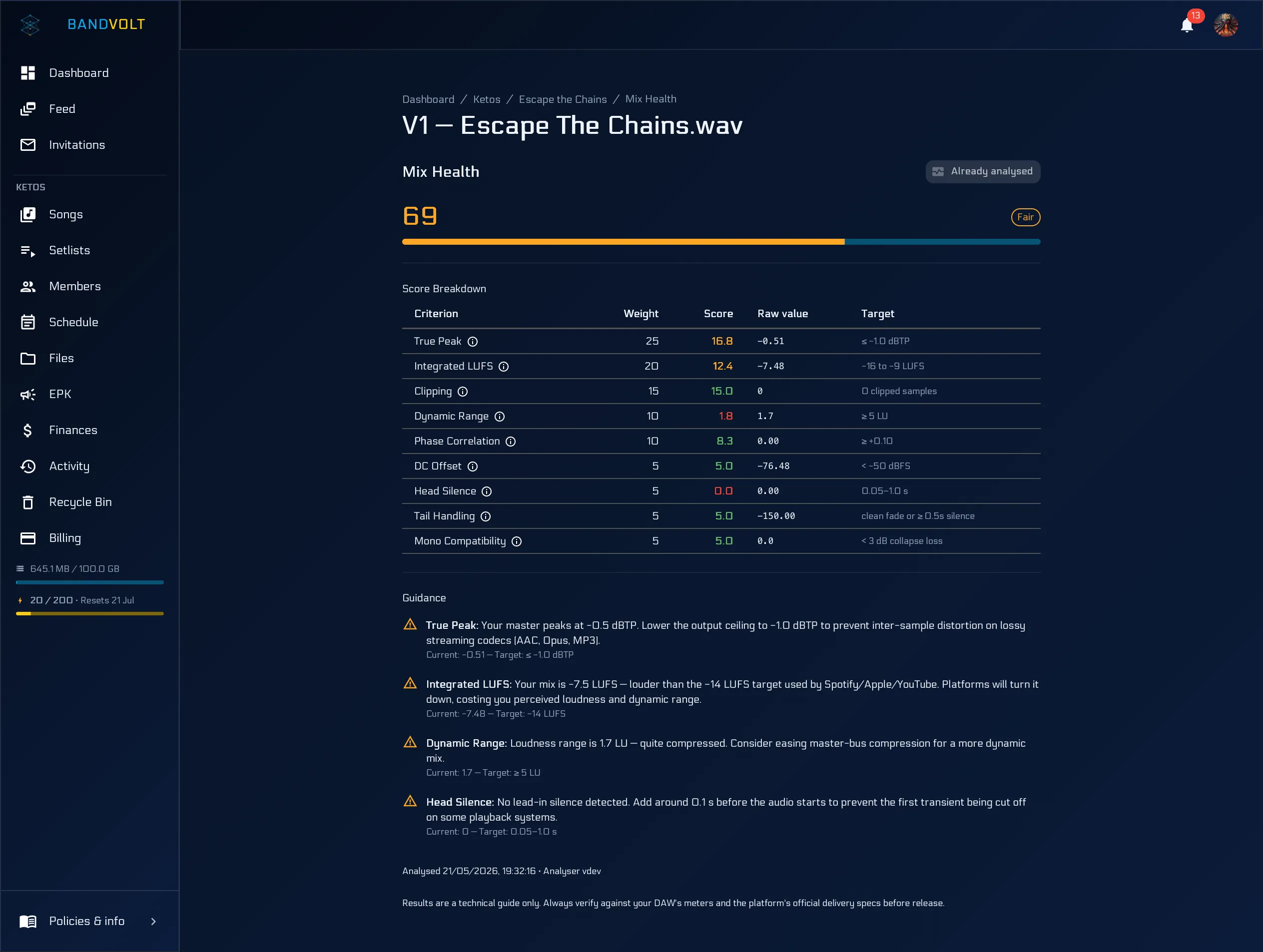
The short answer: a mix is technically release-ready when it has headroom (true peak at or below about -1.0 dBTP), sits at a sensible streaming loudness, has no clipping, keeps some dynamic range, survives being summed to mono, and has no DC offset or stray silence at either end. Mix Health checks all of that on demand and returns a 0-100 score with plain-language fixes.
You have listened to the mix ten times. The band is happy. You are about to bounce it for mastering or upload it to your distributor - and then someone asks: is it actually loud enough? Are we clipping? Is the stereo going to collapse on a phone speaker?
Those are fair questions. They are also tedious to answer without opening a meter plugin, cross-checking a loudness target, and hoping you remember what changed between v3 and v4.
Two different questions
The word “ready” is doing a lot of work when a band says a mix is ready, and it hides two separate questions:
- Is it finished artistically? Do the parts sit right, is the arrangement doing what you want, does it feel like the song you set out to make? Nobody can answer that but the band.
- Is it technically sound? Will it survive mastering, encoding, streaming normalisation, and a phone speaker without something going wrong that you did not intend?
Bands are usually good at the first and guess at the second. Mix Health only claims to answer the second - but the second is where the avoidable disasters live, because they stay invisible until the record is out and somebody’s earbuds make the chorus fall apart.
A technical score, on your terms
Mix Health gives each mix version an objective 0-100 technical quality score, a plain-language label (Release Ready, Good, Fair, Needs Work), and a breakdown across the criteria that actually matter for release-readiness: loudness, true peak, clipping, dynamic range, phase, DC offset, head and tail silence, mono compatibility, and more.
Nothing runs automatically when you upload. A band member clicks Run Health Check on the version they care about. The mix is analysed server-side - deterministic scoring, not AI - and results usually land in under a minute, with live updates while the check runs.
That “on demand” part is deliberate. Bands upload rough phone demos, reference tracks, and half-finished ideas, and scoring those would be noise. You run a check when the question actually matters.
What the criteria mean
The score is only useful if you know what it is measuring. Here is the plain-English version of what gets checked and why anyone should care.
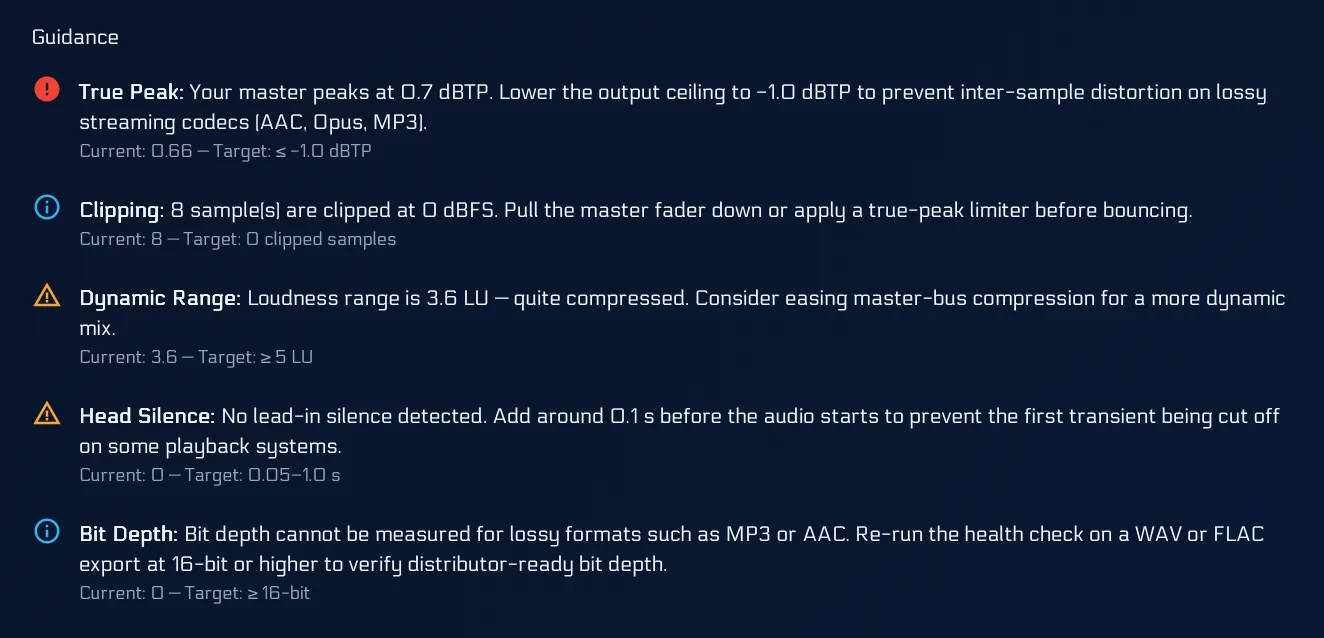
True peak
The loudest instantaneous level the waveform reaches - including the peaks that appear between samples when the file is converted to MP3 or AAC, or played through a converter. A file that never exceeds 0 dBFS on a normal sample-peak meter can still clip once it has been encoded.
Target: at or below -1.0 dBTP. That headroom is what stops distortion appearing during encoding, which is one of the most common ways a mix that sounded fine at home ends up crunchy on a streaming service.
Integrated loudness (LUFS)
How loud the whole track feels to a human, averaged across its length. Streaming services normalise playback, so pushing a master to be as loud as possible mostly means it gets turned back down again - having already given up its dynamics to get there.
Target: somewhere near the streaming range. Louder is not better once normalisation exists; it is just flatter.
Clipping
Samples that have run out of headroom and been squared off. A little is a stylistic choice on some records. A lot, unintentionally, sounds like a broken speaker.
Dynamic range
The distance between the quiet parts and the loud parts. Crushing this is what makes a mix tiring after ninety seconds - loud all the way through, with nothing left to give when the chorus arrives.
Phase correlation and mono compatibility
Whether your stereo image survives being summed to mono. This is the one that catches people out, because almost nobody checks it and an enormous number of real listening situations are mono or near-mono: phone speakers, a single Bluetooth speaker, PA fills, laptop speakers.
A wide, heavily-stereo mix can lose its low end, or lose an entire instrument, when summed. Finding that out from a health check is considerably better than finding out from a promoter.
DC offset, head and tail silence, format
Housekeeping that nonetheless gets releases rejected: a waveform sitting off centre, three seconds of dead air at the start, a sample rate or bit depth your distributor will not accept.
What you get back
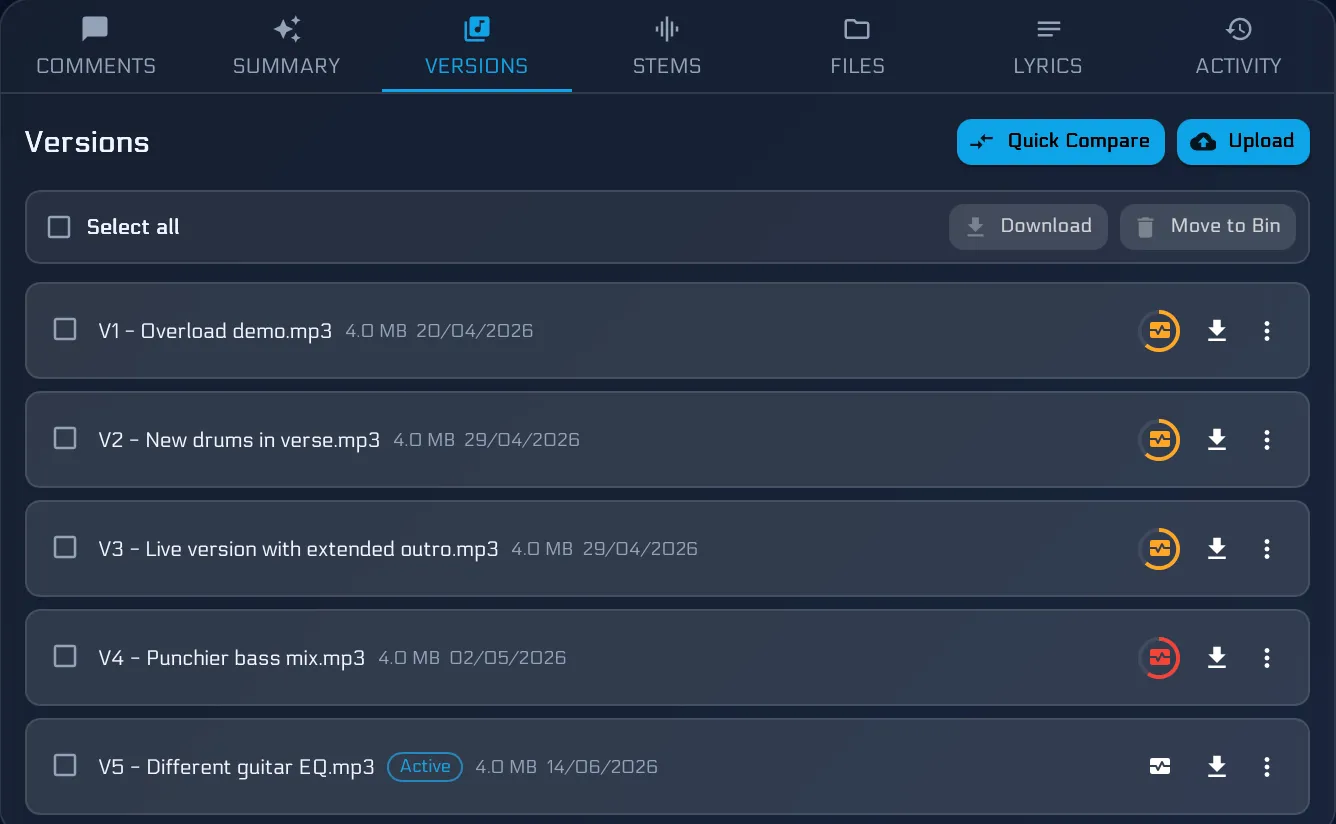
- A health badge on the versions list so everyone sees the score at a glance
- A dedicated Mix Health view per version with criterion-by-criterion detail
- Actionable guidance with concrete targets (for example, true peak at or below -1.0 dBTP and streaming-friendly loudness) and practical fix suggestions
- Quick Compare score deltas when you are auditioning two versions that have both been checked - hear the difference and see how the numbers moved
Each health check costs 5 Volts when analysis runs (refunded if the job is cancelled or fails). Basic bands get 10 Volts per month; Premium gets 200 Volts per month. See our Terms of Service for the full Volts credit-back policy.
Using the score without being ruled by it
A number out of 100 invites a bad habit: chasing the number. Some notes on using it well.
Do not optimise for 100. A deliberately loud, aggressive master and a dynamic acoustic record are different animals, and one of them will always score lower on dynamic range. The score is a checklist, not a verdict on the music.
Do read the breakdown, not just the badge. “Fair” with one failed criterion you chose on purpose is a completely different situation from “Fair” spread thin across everything.
Do check the version you are actually sending. Run it on the final bounce, not the one from two weeks ago that happened to be handy.
Do trust the distributor’s spec over anything else. If your distributor publishes delivery requirements, those are the requirements. This is guidance to get you close before you get there.
Where it fits in the release run-up
The natural place for a health check is the moment just before a mix leaves the band - going out for mastering, going to the distributor, or going out with a playlist pitch.
A workflow that works:
- The band settles on a mix using version history and timestamped notes.
- Someone runs a health check on that specific version.
- Anything flagged gets fixed and re-bounced as a new version.
- Run the check again and use Quick Compare to confirm the numbers moved the right way - and that the fix did not cost you something you liked.
- Ship it.
Step 4 is the one bands skip, and it is the one that catches the fix that quietly made something else worse.
Different job from AI Mix Summary
Mix Health answers a technical question: does this file look release-ready on the meters?
AI Mix Summary answers a creative one: what is the band asking us to change in the comments?
They complement each other. Run a health check before you send a mix out; run a summary when the comment thread is fifty notes deep and the producer needs a punch list.
Guidance, not gospel
Mix Health is a technical guide to help you ship cleaner mixes. It is not a substitute for your DAW, your mastering engineer, or your distributor’s official delivery specifications. When in doubt, trust the spec sheet and your ears.
What it is good for is removing a category of anxiety. Most bands releasing music independently are not sure whether the technical side is right, have no straightforward way to check, and find out too late. A score and a breakdown will not make you a mastering engineer - but it will stop you shipping something clipped.
Run your first health check, or read more about how the Mix Health Score works.
Frequently asked questions
What makes a mix release-ready?
Technically, a release-ready mix has headroom for the mastering and encoding stages (true peak at or below about -1.0 dBTP), sits at a sensible loudness for streaming, has no clipped samples, keeps enough dynamic range to breathe, stays coherent when summed to mono, and has no DC offset or awkward silence at the head or tail. Artistically, release-ready is a decision only the band can make.
What is a good LUFS level for streaming?
Most streaming services normalise playback, so a mix mastered far louder than the normalisation target gets turned down anyway - and has lost dynamics for nothing. Aiming near the streaming range, with true peak at or below -1.0 dBTP, is a safe default. Always check your distributor's own delivery spec, because that is the one that counts.
Does a Mix Health check replace a mastering engineer?
No. It is a technical guide, not a mastering service and not a substitute for a distributor's official delivery specification. It catches the objective problems that are embarrassing to discover after release - clipping, phase issues, no headroom - so the human decisions can be about the music.
Does running a health check change our audio?
No. Analysis is read-only. Your uploaded file is stored and played back exactly as you uploaded it, at full quality, whether or not you ever run a check on it.
What does a Mix Health check cost?
Each health check costs 5 Volts, refunded if the job is cancelled or fails without producing a score. Basic bands get 10 Volts per month and Premium bands get 200, and any member can top the band up with a one-time pack of 100 Volts.
Topics: mix health score · mix readiness · release ready mix · true peak · LUFS