

AI Mix Summaries - what the band is really telling you
Forty timestamped comments on a mix is a lot to read. AI Mix Summaries turn the noise into a clear list of what to change next.
By @KHeavy · Updated 26 October 2026
A healthy band leaves a lot of comments on a mix. Forty, fifty, sometimes more - across the verse, the chorus, the bridge, the outro. By the time the producer sits down to revise, they are scrolling through a thread that took everyone a week to write.
The signal is in there. It just takes a while to extract.
The short answer: AI Mix Summary reads the unresolved comments on a mix and turns them into a short summary plus a prioritised list of what to change next. Overlapping notes get grouped. One-off asides get less weight. The original comments stay pinned to the waveform. It costs 1 Volt when it generates new text, on any tier that still has Volts.
What you are actually looking at
The comments on a song are already the right record. Each one can sit on a precise second, scoped to the mix version it was written about, with replies, likes, and a resolved state once somebody has actioned it. That is the point of timestamped feedback: the note lives on the music, not in a chat that has scrolled on.
The problem is volume. Three people can say the vocal is sitting back, in three different sentences, at three different timestamps, and a fourth can be talking about the bridge length. A producer who re-reads the thread from the top spends the first half hour of the session sorting that out. The session was supposed to be for the mix.
AI Mix Summary is that sort, done once, in the app. You trigger it yourself from the song. It does not run in the background every time somebody posts.
What the summary contains
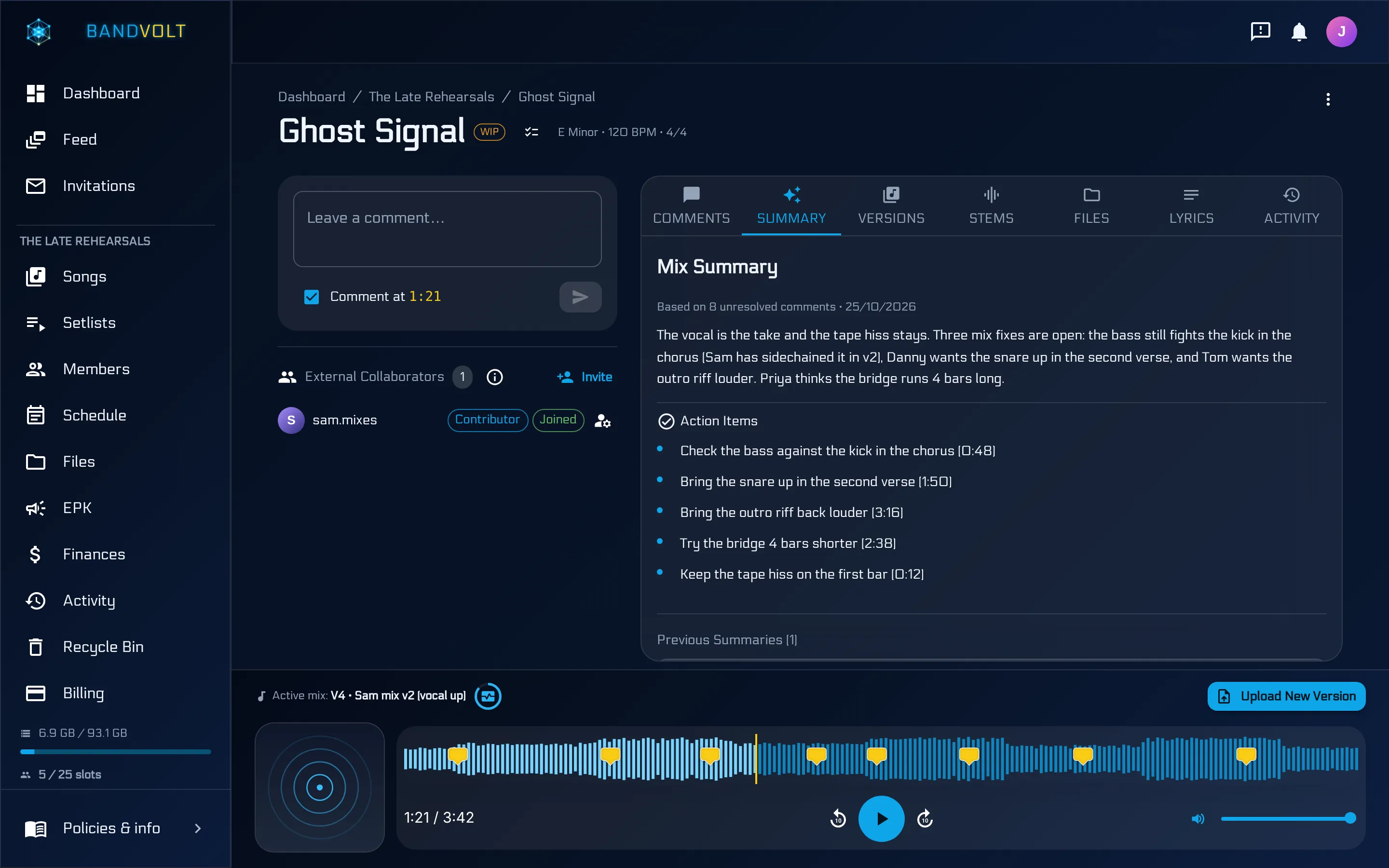
On the song, Summary sits with Comments, Versions, Stems, Files, Lyrics, and Activity. A fresh summary says how many unresolved comments it is based on, and the date. Under that is a short paragraph of what the band is asking for, then action items. Each action item carries the timestamp it came from, so “the snare in the second verse” is a place you can play, not a sentence you have to hunt for.
The shape is easy to see on a song that already has a thread. Eight unresolved comments become a paragraph and a handful of actions: check the bass against the kick in the chorus, bring the snare up in the second verse, bring the outro riff back, try the bridge four bars shorter, keep a noise on the first bar that the band wants left in. Mix notes and an arrangement note land in the same list, because that is what people wrote. The summary does not invent a second opinion the band did not give.
Previous summaries stay listed. Generating a new one does not wipe the last punch list, which matters when you want to see whether this round of notes is the same argument as last week.
Resolve the noise before you spend the Volt
The summary is built from unresolved comments. That is a habit, not a hidden setting.
If a note is done, mark it resolved. Resolved threads can be hidden, and they drop out of the next summary, so the punch list stays about the work that is still open. If a comment is a joke, a “sounds great”, or a question that has already been answered in the replies, resolve it. Likes are for a quick acknowledgement without adding another paragraph. @mentions are for the person who actually needs to see the note.
Do that pass first. Then generate the summary. You spend the same 1 Volt either way, and the list is shorter if the thread is tidy.
The comments themselves are not replaced. Everyone’s notes stay on the waveform, on the version they were written against. The summary sits on top of that record. If a line in the action list feels wrong, open the comment it came from and read the thread. Treat the summary as a reading of the band, and check it against the notes when a line surprises you. If the notes themselves are vague, the summary cannot invent precision. How to give feedback on a mix is the habit that makes the action list useful.
How to use it in the revision
A workable order, once the new bounce is up as the active mix:
- Ask the band to comment on that version, on the second, not in the group chat. A note on v3 stays off v1, because comments are scoped to the version they were written on.
- Leave it a couple of days if you can. A summary of three comments is not worth the ritual.
- Resolve anything already done, including notes that were only ever about the previous bounce.
- Generate the summary. Read the action items in the session, or hand the list to the person who is mixing.
- As each item is done, resolve the comments behind it. The next summary starts from what is still open.
- When you need to hear whether the change worked, use Quick Compare on the two versions at the same playback position. Turn on loudness matching if one bounce is simply louder, so the level does not decide the argument for you.
When the question is “is this ready to send?” rather than “what did the band ask for?”, that is a different check. Mix Health scores the file - loudness, true peak, clipping, dynamics, phase, mono compatibility - and costs 5 Volts. The summary answers the people. Mix Health answers the meters. They belong on the same afternoon, and they are different jobs.
Taking the list out of the app
From the song menu, Export data downloads mix summaries as Markdown, alongside comments, activity, and Mix Health if you tick those boxes. The summary file keeps the generated text and the action items, so the punch list can sit in a session folder next to the WAVs. Nothing is removed from the song when you export. The longer version of that archive is in export song data as Markdown.
What it costs
One Volt per summary, when new text is actually generated. Basic bands get 10 Volts a month. Premium bands get 200. Included Volts reset each month and do not roll over. A one-time pack of 100 Volts is £4.99 if a heavy week of revisions blows the allowance. Purchased Volts are spent only after the monthly ones run out, and they do not expire when the month resets.
If a generation fails before any text comes back, that Volt is credited back to the band. You are not paying for a blank page.
Ten Volts is ten summaries. A band revising two or three songs in a month will be fine on Basic. A studio running summaries across a roster will feel the Premium allowance. There is no separate AI subscription on top of the band’s plan. The full numbers are on the pricing page.
The walkthrough video on this page is the same control in the app.
When not to bother
Three comments do not need a summary. A thread that is one person talking to themselves does not need a summary. And a summary will not rescue notes that were vague to begin with. “The second chorus feels weird” still becomes an action item that says the second chorus feels weird. The useful notes name the part, the instrument, and the direction - vocal up, hat down, bridge shorter.
There is a longer version of how to write those notes in timestamped feedback that lands, and a comparison with the group-chat version of the same job in WhatsApp vs timestamped mix feedback.
Frequently asked questions
What does AI Mix Summary actually read?
Unresolved comments on that mix, including their timestamps and like counts. Resolved notes stay on the song and stay out of the next summary. The original comments are not deleted or rewritten.
How much does a mix summary cost?
1 Volt when new text is generated. Basic includes 10 Volts a month and Premium includes 200. A one-time pack of 100 Volts is £4.99. If a generation fails before any text comes back, that Volt is credited to the band.
Does the summary replace the comments?
No. Comments stay pinned to the waveform on the version they were written for. The summary is a separate reading of the unresolved ones, and earlier summaries stay listed.
Can I keep the action list offline?
Yes. Export data on the song downloads mix summaries as Markdown, along with comments, activity, and Mix Health if you tick those. Export copies the record. It does not remove it from the song.
Is a mix summary the same as Mix Health?
No. The summary is a reading of what people wrote. Mix Health is a technical check of the audio file and costs 5 Volts. One tells you what the band asked for. The other tells you what the meters say.
Topics: AI mix summary · mix feedback tool for bands · production notes