

From rehearsal room to release - a workflow checklist
A simple, repeatable flow for taking a song from voice memo to released single without losing the thread.
By @KHeavy · Updated 26 October 2026
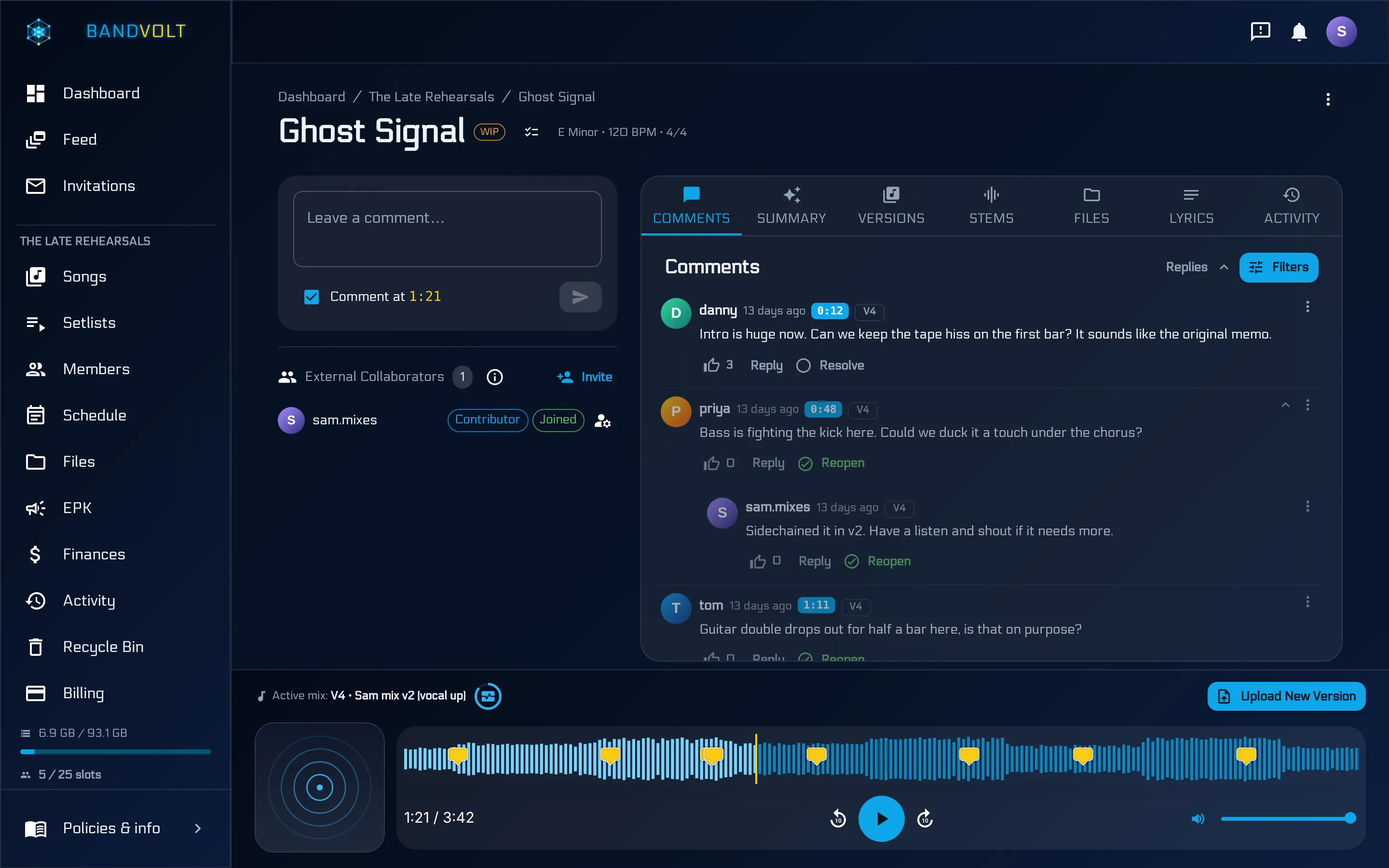
Most bands have a writing process. Few have a workflow. The difference shows up when you are trying to ship a song instead of leaving another demo in a folder called New.
The failure is rarely the music. It is the thread. The voice memo is on one phone. The first bounce is in a chat. The notes are in a different chat. The studio date was agreed and then never written down. Six weeks later nobody can say which file is the song.
The short answer: one song in one workspace, from the first hum to the release link. Versions instead of new filenames, notes on the waveform, sessions on the calendar, costs in the ledger, and a public link when it is actually finished. Here is that path as a checklist you can run inside BandVolt. The walkthrough at the bottom is the version half, which is where most of the mess starts.
1. Capture the idea as a song
The day the riff exists, create the song. A working title is enough. Upload the voice memo as version one, before it joins the voice memo graveyard. If you know the BPM, the key, and the time signature, put them on the song now. Lyrics can be a fragment. Artwork can wait.
A memo in a camera roll is not a song the drummer can find on Thursday. Group it into an album, an EP, or a collection when you know where it belongs. You can move it later without uploading it twice.
Everyone in the band sees the same library once they have been invited. That invite is by username or email, with their own login, which is the members half of a band workspace. Do not start the project in a folder only one of you can open.
2. Iterate as versions, not as new files
Every new take, every bedroom mix, every bounce the producer sends goes on as the next version of that same song. Each one is labelled, dated, and played from its own waveform, at the quality you uploaded. BandVolt does not compress the file to save space.
Set the mix people should be listening to as the active mix. Mark a final when you mean it. The earlier takes stay, so “the one from March where the snare was right” is still a version, not a filename you hope someone kept.
Stems belong on the song too, on the Stems tab, not in a parallel folder called stems_final. The walkthrough under this post is this step: a new version, the active mix, the stems, the download. The longer argument against final_final_v3 is in stop sending final_final_v3, and the feature itself is mix version control.
3. Pin the feedback to the music
Notes go on the waveform, at the second they refer to, on the version they refer to. Reply in the thread. Like a note if you agree and have nothing to add. Resolve it when it has been done. @mention the person who has to act on it, so the notification goes to them rather than to the whole chat.
Filter to the active mix when you are revising, so last month’s notes on an old bounce are not still shouting. Hide resolved threads when you want the remaining work.
When the thread is too long to re-read, generate an AI Mix Summary. It reads the unresolved comments and returns a short list of what to change. That costs 1 Volt. It does not replace the comments.
Before you call a bounce releasable, decide whether you also want Mix Health on it. That is the technical pass - loudness, true peak, clipping, dynamics, phase, mono - and it costs 5 Volts. The band’s ears and the meters catch different problems. A song can have no open comments and still be clipping. It can measure fine and still have a chorus the singer hates.
If two bounces are close, Quick Compare plays them at the same position, with loudness matching so the louder one does not win by default.
4. Put the paper on the song
Chord charts, lyric sheets, and session notes go on the song’s files. Stems go on Stems. The band’s general file storage is for everything that is not a song: the tech rider, press shots, contracts, the logo. Mixing those two piles is how a chart ends up in a folder nobody opens, and a rider ends up attached to a WAV.
When you want a copy on your own disk, Export data from the song menu downloads Markdown for comments, mix summaries, activity, and Mix Health. Select all, then Download, on Mixes, Stems, or Files takes the audio and the attachments. Both are copies. The song stays where it is. The steps are in export song data as Markdown.
5. Put the days on the calendar
Tracking, a mix playback, a deadline you have promised a label: if someone has to be free, it is an event on the shared calendar. Date, time, place, and a description. Link a setlist when the song is going out live, including the rehearsal where you are learning the version you will actually play. That is a different problem from the recording, and it is covered in rehearse the live version, not the album cut.
A date that only exists in a message will be missed. A date on the calendar can be moved once, with the files and the setlist still attached.
6. Log the cost while you still have the receipt
Studio time, the session player, mastering, the artwork, the rehearsal room you booked to write the middle eight. Log it when you spend it, in the shared ledger, with the receipt on the entry. Recurring costs - the room, the subscriptions - can repeat on their own.
At the end of the campaign you can see what the song cost, and every member is looking at the same numbers. Reconstructing that from bank notifications in December is how bands stop trusting each other. The ledger, and a sane way to split what comes back, is in splitting band income without the awkward meeting and on band finances.
7. Send it when it is finished, not while it is nearly finished
A public song link plays the song for anyone with the URL. No account on their side. On Basic you can keep three of those active. On Premium, song links are unlimited and you can share the whole EP or album as one collection. Choose whether the link follows the active mix or stays pinned to the version you are happy to show.
Press and booking are the Electronic Press Kit, free on every tier: bio, featured tracks, photos, and a contact, on one page. A share link is “listen to this”. An EPK is “this is the band”. The difference, and the way to send a whole EP to a label, is in send your music to anyone and how to send your EP to a label.
If a guest needs to comment or deliver a take before you get there, that is an invite, not a public link. Contributors and Reviewers are Premium, scoped to the song or the album, and written up in working with session players.
One pass, in order
You do not have to do all seven on the day you write the riff. You do have to do them in an order that does not lose the thread: the song exists, the versions stay on it, the notes stay on the versions, the dates and the money are written down, and the link goes out when you mean it to.
Frequently asked questions
Where should a new song start?
Create the song the day the idea exists. Give it a working title, upload the voice memo as the first version, and add the BPM and key if you know them. A riff that only lives in a phone's voice-memo app will not survive contact with the next rehearsal.
Should every bounce be a new song?
No. Every demo, rough mix, and master is a new version of the same song, in order, with the one you want people to hear set as the active mix. New songs are for new songs. New files of the same song are versions.
When is a mix ready to send out?
When the unresolved comments are dealt with and, if you want a technical pass, Mix Health has scored the file. The band's notes and the meters are different checks. Do both before you call a bounce the one you are releasing.
What do we do with stems and chord charts?
Put them on the song. Stems on the Stems tab, charts and lyric sheets on the song's files. The band file manager is for the things that are not a song: riders, press shots, contracts.
How do we send the finished single without making people sign up?
A public song link, on every tier, with up to three active on Basic. Premium adds a public link for the whole EP or album. For press and booking, publish the Electronic Press Kit as well. Neither link requires an account to open.
Topics: band workflow · release checklist · recording process