

Stop letting loudness choose your mix
Why the louder bounce always wins an A/B - and how Quick Compare loudness matching levels every version so you hear the mix decisions, not the master bus gain.
By @KHeavy
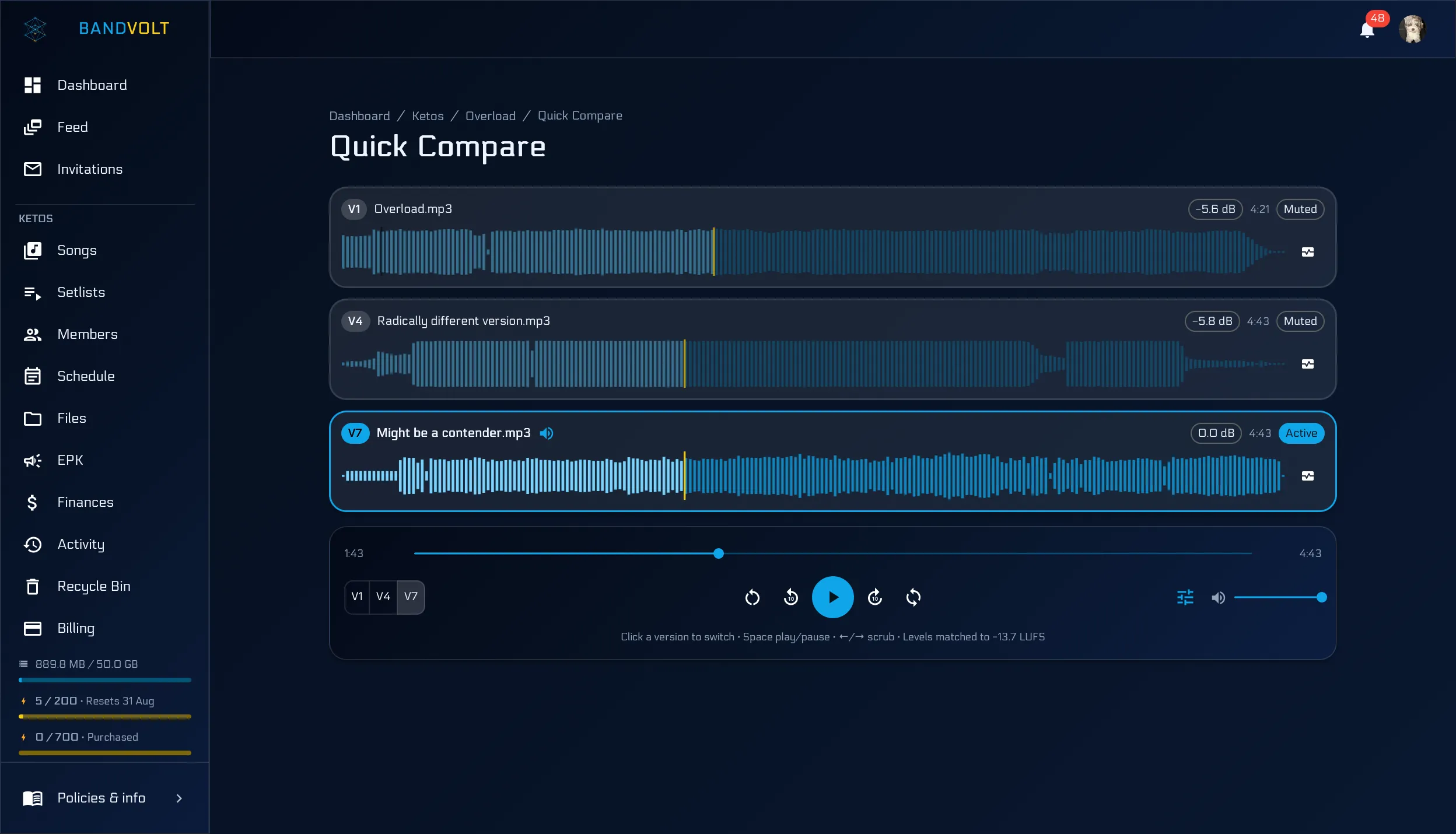
A producer sends a new master. You flip to it. It sounds bigger, clearer, more finished.
Then you check the meters and realise it is nine decibels louder than the rough mix you were comparing it against.
You were not hearing a better mix. You were hearing gain.
The bias is not optional
This is not a taste problem. A small level bump reads as more presence and excitement whether or not the balance improved. Studio engineers know it; bands rediscover it every time a mastered bounce sits next to a working mix and “wins” a vote that was never about the music.
The usual workarounds are fragile:
- Nudging volume sliders by ear between two browser tabs
- Asking everyone to “ignore that it’s louder”
- Pretending the last thing you heard was not automatically favoured
None of those survive a five-person listening session.
Same spot, same level
Quick Compare already fixed the first half of a fair A/B: one playhead, two (or more) versions, instant switching at the same moment in the song. The gap and the “roughly the same spot” error are gone.
Loudness matching fixes the rest. Turn it on in the transport and every version in the session plays at the same perceived loudness. The louder master comes down. The quiet rough mix stays where it is. What remains audible is the vocal ride, the low end, the reverb decision - not who pushed the bus harder.
Each version shows the exact attenuation applied (−5.6 dB and so on), and the transport names the target. Engineers who will not trust an invisible process get a number they can verify.
Match down, never boost
The target is always the quietest measurable version in the set. BandVolt never turns anything up to meet a louder bounce - that would risk clipping and force a limiter into the playback path, which colours the sound and defeats the point.
Measurement uses the same perceptual loudness standard mixing and streaming tools already speak (ITU-R BS.1770), computed in the browser from the decode you already need for waveforms. No second download. No Volts. No Mix Health dependency. Audio still only moves between your browser and storage over signed URLs.
When to use it - and when not to
Use it when you are deciding between revisions: a mastered candidate against a working mix, two producers’ takes, or “does this vocal ride actually help?”
Leave it off when absolute level matters - checking whether a bounce is already slamming, or comparing to a reference at its real commercial loudness.
It is off by default so matching never silently rewrites what you hear. Flip it on for the session; the preference sticks for next time.
Ears first, then the call
Once levels are honest, the notes get sharper and the vote gets shorter. A lot of “the new one is better” evaporates into “these are basically the same” - which is useful. It means the mix has stopped improving and the song is ready to go.
Pair it with Mix Health deltas when both versions are analysed if you want numbers next to the listen. Ears still go first.
Try Quick Compare with loudness matching, or read the longer guide to hearing what actually changed.
Frequently asked questions
Why does the louder mix always sound better?
A small increase in level reads to the ear as more clarity, weight, and excitement, even when nothing in the balance improved. Matching perceived loudness before you judge is the only way to hear what actually changed.
How does BandVolt loudness matching work?
In Quick Compare, turn on loudness matching in the transport. BandVolt measures each version's integrated loudness in the browser and attenuates the louder ones down to the quietest, so nothing is boosted or limited. Each version shows the exact dB offset applied.
Does loudness matching cost Volts or require Mix Health?
No. It is free on every tier, costs no Volts, and does not need a Mix Health run. Measurement happens in your browser during the same decode already used for waveforms - the audio never goes to the API for this.
Should loudness matching be on by default?
It is off by default on purpose. Matching changes playback levels, so it is an explicit opt-in when you want a fair comparison. Leave it off when you need to hear absolute levels as they were bounced.
Topics: mix loudness matching · A/B compare mix versions · level match mixes · Quick Compare